Greed: The Terminal Game That Eats Itself
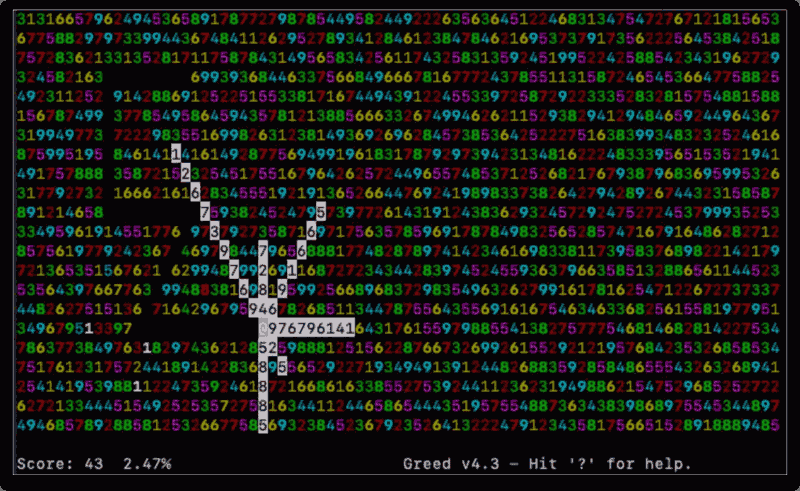
If you've ever wanted a game that rewards careful thinking but punishes you for being too clever, Greed is it. It's a deceptively simple terminal strategy game where the goal is to consume as much of the board as possible, without trapping yourself in the process.
What is Greed?
Greed is a curses-based terminal game originally written for Unix by Matt Day in 1996, adapted from a DOS freeware game of the same name. After Day stepped away from the project, Eric S. Raymond (ESR, author of The Cathedral and the Bazaar and longtime Unix toolsmith) adopted it, added color support, and continues to maintain it today. The current stable version is 4.3, released under the BSD 2-Clause license.
The concept is razor thin: you sit in the middle of a 79×22 grid packed with random digits 1–9. You move in one of eight directions. The number you land on determines how far you travel — and every cell you pass through gets consumed. The game ends when you can't move anywhere. Your score is how many cells you've eaten.
Gameplay
The rules take about thirty seconds to learn. The strategy takes much longer to master.
- The board starts full of random digits 1–9
- Your position is marked
@ - Each move you pick a direction (any of 8, including diagonals)
- You travel exactly N cells in that direction, where N is the digit in the first cell you'd enter
- Every cell along the path is erased
- You can't move off the board or into already consumed space
- When no legal move exists in any direction, the game is over
The tension comes from how quickly you can corner yourself. A high digit might eat a satisfying chunk of the board, but it can also wall you off from the remaining space. Low digits give you precision but less score. Every move is a small gamble.
Toggling the move highlight mode (press p) will show you which directions are currently legal — useful when you're trying to identify the least bad option before it disappears.
Installing Greed
Linux
Greed is packaged in most major distributions:
# Debian / Ubuntu / Mint
sudo apt install greed

# Fedora / RHEL / Rocky / AlmaLinux
sudo dnf install greed

# Arch Linux
sudo pacman -S greed
From source:
The canonical source lives on GitLab, maintained by ESR:
git clone https://gitlab.com/esr/greed
cd greed
make
sudo make install
macOS
Using Homebrew:
brew install greed
Keybindings
Greed supports three control schemes simultaneously, so you can use whatever feels natural:
| Direction | Arrow Keys | vi Keys | WASD-style |
|---|---|---|---|
| Up | Up | k |
w |
| Down | Down | j |
x |
| Left | Left | h |
a |
| Right | Right | l |
d |
| Up-Right | — | u |
e |
| Up-Left | — | y |
q |
| Down-Right | — | n |
c |
| Down-Left | — | b |
z |
The numeric keypad works for all 8 directions as well.
| Key | Action |
|---|---|
p |
Toggle move highlighting |
Ctrl-L |
Redraw the screen |
q |
Quit |
A Few Extra Tricks
Color output is configurable via the GREEDOPTS environment variable. It takes a 9-character string where each character maps to a color for digits 1–9. For example:
export GREEDOPTS="rGcYbMwCg:p"
Appending :p to GREEDOPTS enables move highlighting from the start, which is handy if you always want it on.
High scores are stored at /var/games/greed/greed.hs — so there's a real scoreboard if you're playing on a shared system.
Why Play Greed?
Greed is the kind of game that fits perfectly into the two minutes before a build finishes. It's fast to start, fast to lose, and just complex enough that you'll immediately want a rematch to try a different approach. There's no randomized luck in how the board unfolds — the digits are set at the start. Every loss is a bad decision somewhere, which makes it oddly satisfying to keep going back.
It's also a good reminder that in the terminal, you don't need much to make something compelling.
Project page: http://www.catb.org/~esr/greed/ Source: https://gitlab.com/esr/greed